🛠️ Nextcloud Troubleshooting
Fixing the main warnings from the Security and Configuration tab
⚠️ When accessing the Security & configuration warnings tab, your instance may display several alert messages. This guide explains how to fix the main errors, directly via terminal or panel settings.
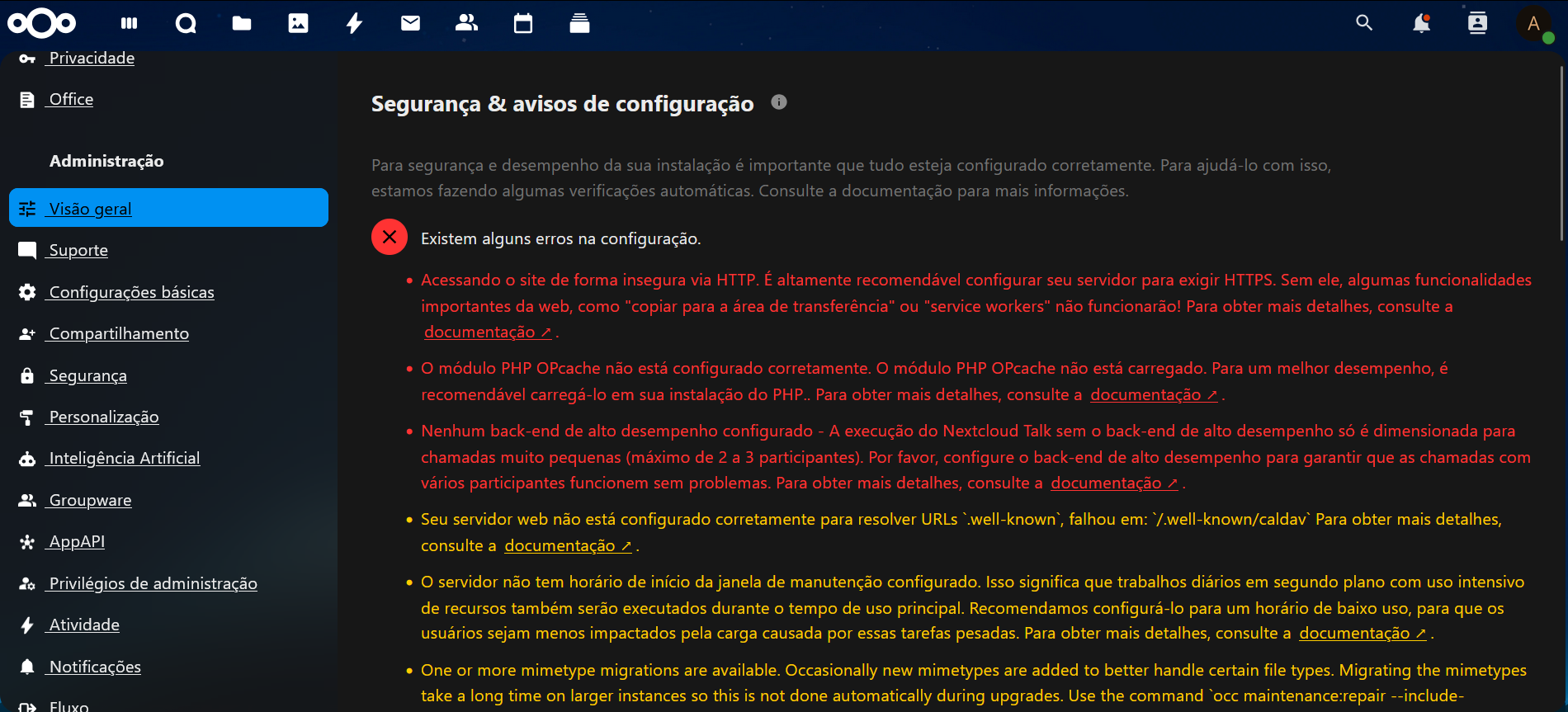
🔐 1. HTTPS not configured
Error: The instance is accessible via HTTP, which compromises security.
✅ Solution:
- Access the Saveincloud panel > Go to the Add-on page
- Install the SSL Certificate with the Let's Encrypt Add-on
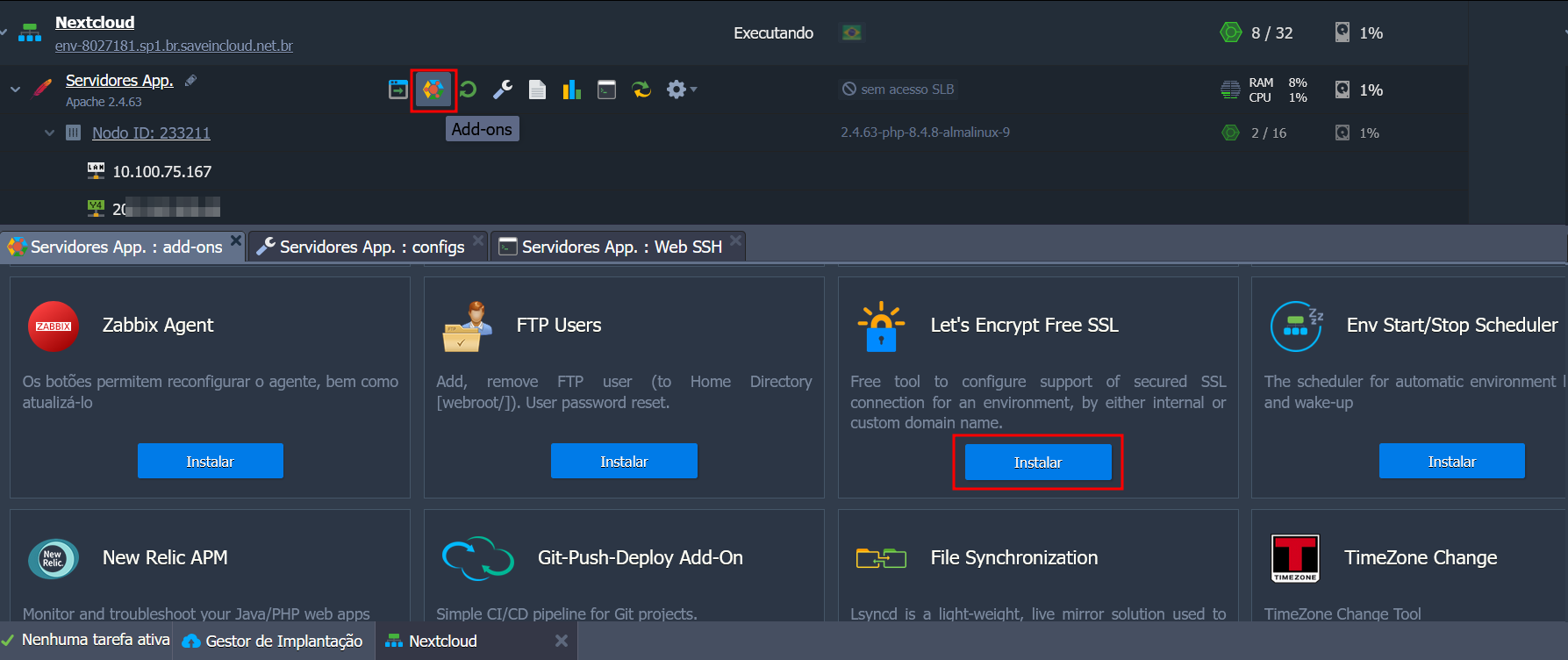
- In the External Domains field, fill in with your own domain if using an external domain, or with the Platform Hostname itself if accessing via the Environment URL
⚡ 2. PHP OPcache not configured
Error: OPcache is not enabled in PHP, impacting performance.
✅ Solution:
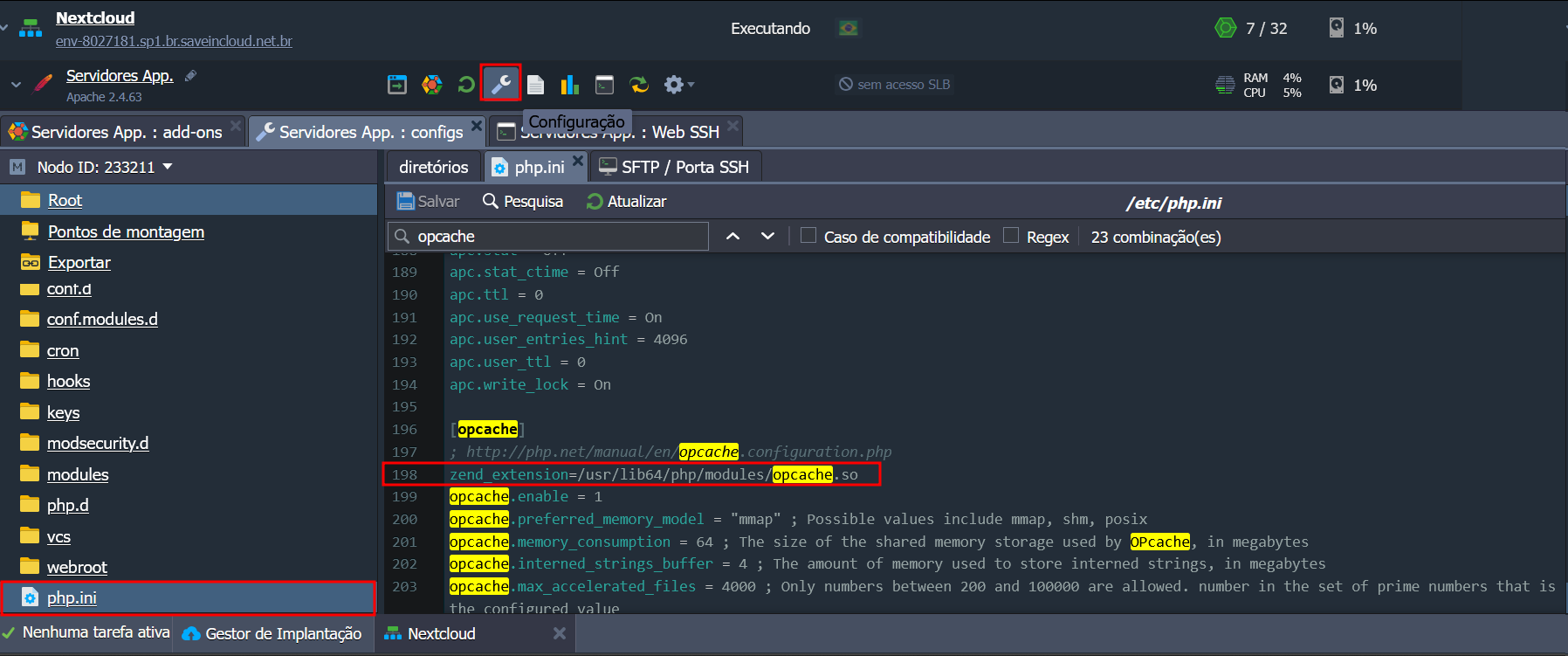
Edit the php.ini of the Apache container and add:
opcache.enable=1
opcache.enable_cli=1
opcache.memory_consumption=128
opcache.interned_strings_buffer=8
opcache.max_accelerated_files=10000
opcache.revalidate_freq=1
opcache.validate_timestamps=1
If these settings are already active and the warning persists, make sure the Zend line is uncommented:
🌐 3. Error in /.well-known/caldav
✅ Solution:
On your Apache/NGINX server, redirect properly:
Redirect 301 /.well-known/caldav /remote.php/dav
Redirect 301 /.well-known/carddav /remote.php/dav
🕑 4. Maintenance window not defined
✅ Solution:
Edit the config.php of the instance and add:
'maintenance_window_start' => 2, // Início às 2h da manhã
📦 5. Pending mimetype migrations
✅ Solution:
Run the command inside the /var/www/webroot/ROOT directory:
php occ maintenance:repair --include-expensive
🧯 6. Missing HSTS header
✅ Solution:
In your reverse proxy or Apache server, add:
<VirtualHost *:443>
  ServerName exemplo.dominio.com
    <IfModule mod_headers.c>
      Header always set Strict-Transport-Security "max-age=15552000; includeSubDomains"
    </IfModule>
 </VirtualHost>
🧬 7. Missing indexes in the database
✅ Solution:
Run the command inside the /var/www/webroot/ROOT directory:
php occ db:add-missing-indices
This will automatically create all the missing listed indexes.
📝 8. Using database for file locking
✅ Solution:
Configure a local Memcache in the config.php located in the ROOT directory:
'memcache.locking' => '\\OC\\Memcache\\APCu',
And enable the PHP module apcu.
🧠 9. Memory cache not configured
✅ Solution:
In the same config.php, add:
'memcache.local' => '\\OC\\Memcache\\APCu',
🌍 10. Default phone region not defined
✅ Solution:
Edit the config.php and include:
'default_phone_region' => 'BR',
📧 11. Mail server not configured
✅ Solution:
Access:
Configurações > Configurações Básicas > E-mail
Fill in the fields with SMTP server, port, username, and password. Click "Send email" to test.
🧪 12. Missing sodium module
Error: Recommended for password security with Argon2.
✅ Solution:
Add the lines in the php configuration file at /etc/php.ini
[sodium]
extension=/usr/lib64/php/modules/sodium.so
🖼️ 13. Missing imagick module
Error: Required for favicon and theme generation.
✅ Solution:
Uncomment the lines referring to the Imagick module in etc/php.ini:
[imagick]
;http://php.net/manual/en/book.imagick.php
extension=imagick.so
imagick.locale_fix = 0 ; Fixes a drawing bug with locales that use ',' as float separators
imagick.progress_monitor = 0 ; Used to enable the image progress monitor
📋 Additional Logs
If you want to analyze the logs directly:
php occ log:tail
Or navigate to:
Configurações > Logs > Ver registros recentes
🧩 Final Tip
Many issues can be resolved with Nextcloud CLI commands. See the full list with:
php occ list
We recommend reading the official nextcloud documentation for more information.
🧠 Recommended checks:
- Check folder permissions (
data,config,apps) - Keep the system always updated
- Backup configuration files before major changes