💾 RabbitMQ
RabbitMQ is an open-source messaging system that acts as an intermediary for sending and receiving messages between different parts of an application or between distinct applications. It is widely used for asynchronous communication, distributed processing, and system integration.
🚀 Installation via Marketplace
- In the SaveinCloud platform dashboard, go to the MARKETPLACE;
- In the search bar, look for RabbitMQ;
- Click Install.

After a few moments, the environment will be created and you will receive the access credentials for the RabbitMQ panel via email.
🔐 Accessing the RabbitMQ platform
With the environment created, you will be able to access the RabbitMQ panel. Upon accessing it, just enter the credentials received by email.

After logging into the panel, you will see the home screen with useful information and functions to manage the platform.
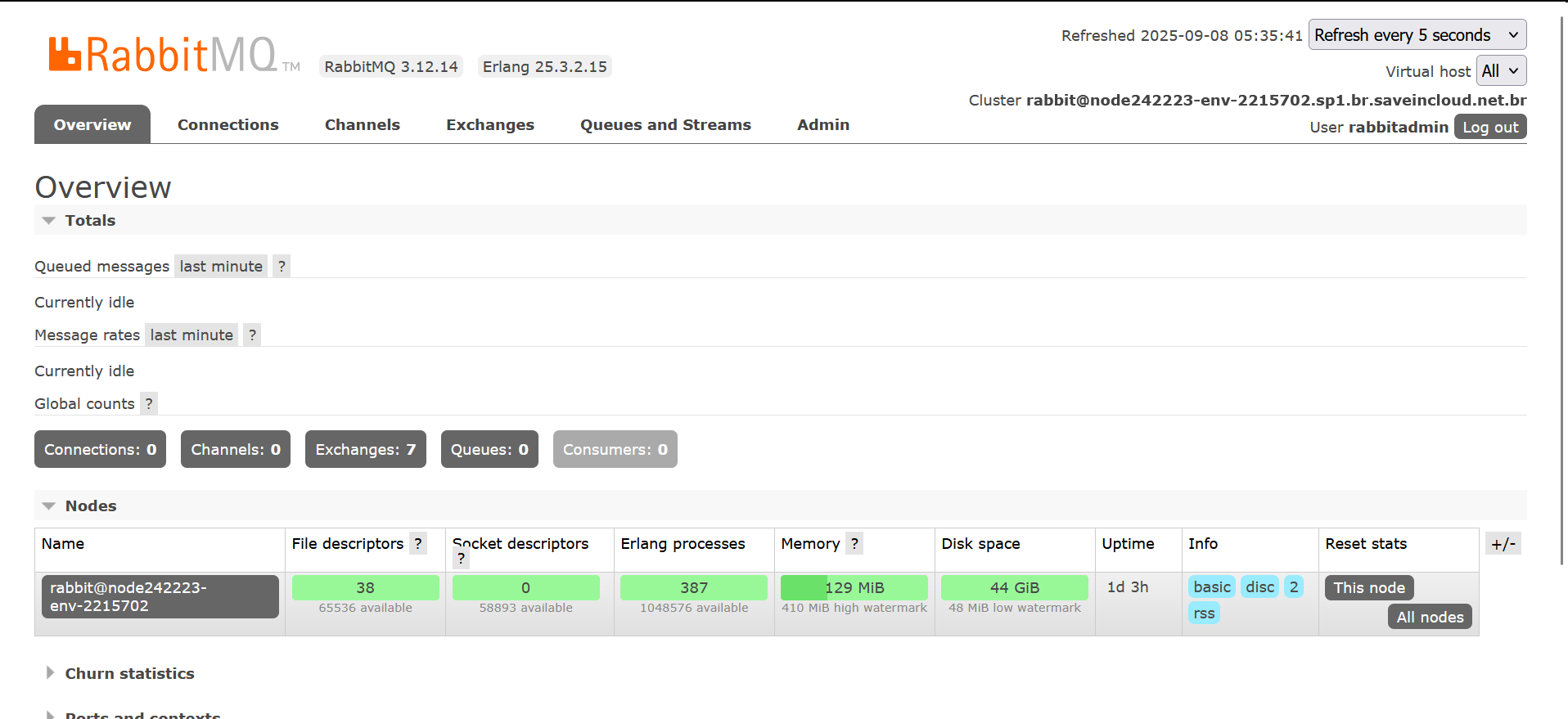
RabbitMQ 3.12.14 → installed version of RabbitMQ.
Erlang 25.3.2.15 → base language used by RabbitMQ.
Cluster → name of the node where RabbitMQ is running. Useful to identify the environment, especially when there are multiple nodes.
Queued messages → number of messages pending processing. → If the number is high, it may indicate slowness in consumers.
Message rates → rate of message publishing and consumption. → Shows if there is active traffic on the broker.
Connections → Channels, Queues, Consumers:
Connections → number of clients connected to RabbitMQ.
Channels → subdivisions within connections to send/receive messages.
Queues → number of configured queues.
Consumers → number of processes/applications consuming messages. → If there are no consumers, messages may accumulate.
⚙️ Specifications of the Generated Environment
- 🐋 Customized application server: Container with 8 Cloudlets
🧠 Questions?
Contact technical support and send your question; we are available to help you!