⏰ Env Start/Stop Scheduler
The Env Start/Stop Scheduler add-on allows you to automatically schedule the start and stop of environments on the SaveinCloud platform, helping with cost optimization by shutting down environments outside of usage hours.
✅ Prerequisites
- Environment running on SaveinCloud
- Permission to manage the environment
🚀 Add-on Installation
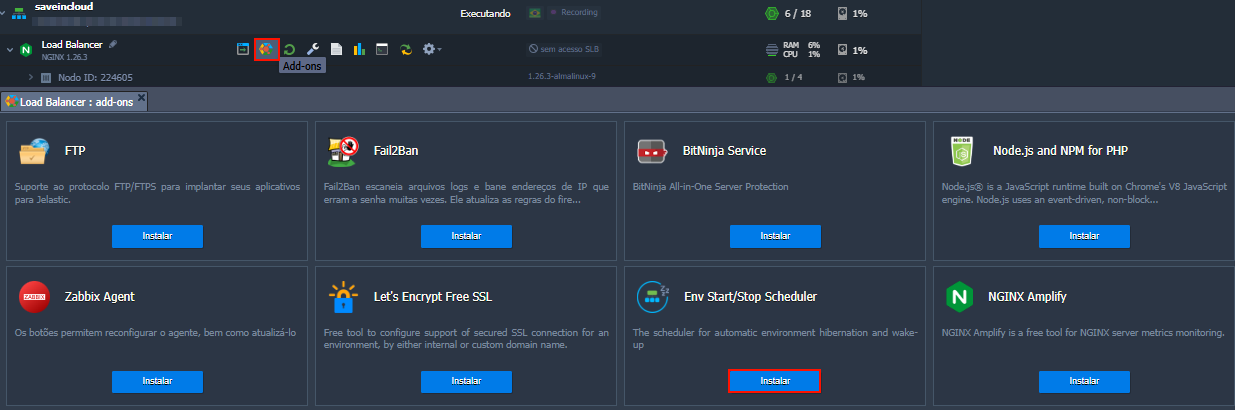
- Access your environment in the SaveinCloud panel.
- Click the Add-ons button.
- Locate the Env Start/Stop Scheduler add-on.
- Click Install.
⚙️ How to Use
After installation, you can configure:
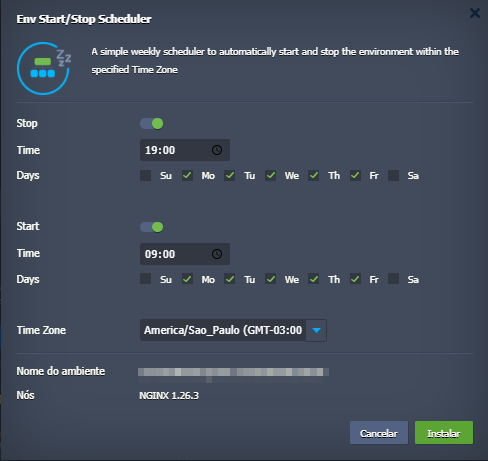
🛑 Stop – Automatic Shutdown
- Time: Time for the environment to stop (in 24h format, example:
19:00). - Days: Days of the week when the stop will be applied (Sunday to Saturday).
▶️ Start – Automatic Startup
- Time: Time for the environment to start automatically (example:
09:00). - Days: Days of the week to start.
🌎 Time Zone
- Set your time zone. Example: America/Sao_Paulo (GMT-03:00).
🧠 Configuration Example
✅ Schedule to stop at 19:00 and start at 09:00, from Monday to Friday:
- 🔥 The environment will be off during the night and on weekends, generating savings.
- 💡 Ideal for development, staging, and testing environments.
🔔 Tips and Precautions
tip
Stopped environments do not generate computational resource costs (cloudlets), only storage, assigned public IP (if any), and licenses (if any).
warning
⚠️ When installing the add-on on any of the instances, all instances of the environment will follow the Start/Stop rule.
✅ Benefits
- Significant cost savings in environments that do not need to be active 24/7.
- Periodic restart of services
- Ease of automation for non-production environments.
🧠 Questions?
Contact the SaveinCloud technical support team. We are ready to help!