🐘 Apache PHP (Legacy Versions) Deployment on SaveInCloud Marketplace
Apache PHP (Legacy) is aimed at applications that still depend on old PHP versions and cannot be immediately migrated to newer versions.
This option should be used only in compatibility scenarios, as outdated versions may contain known vulnerabilities.
🚀 Deployment Step-by-Step
-
Access the SaveInCloud Marketplace.

-
Search for Apache - Deprecated PHP Versions.
-
Click Install.
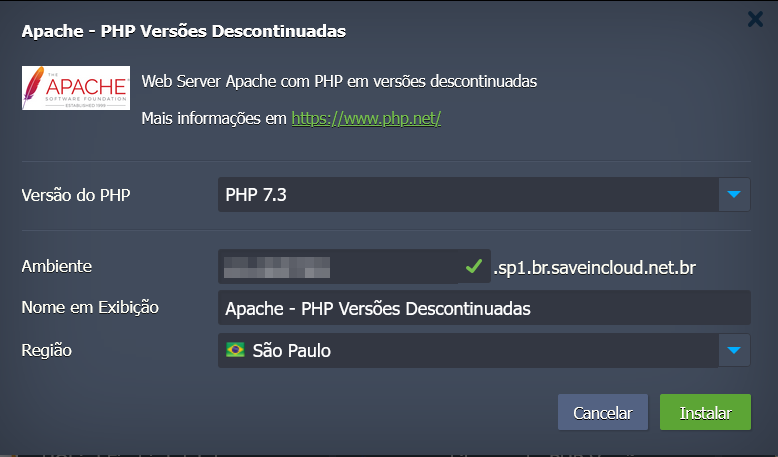
⚙️ Configuration Options
During deployment, you will be able to select:
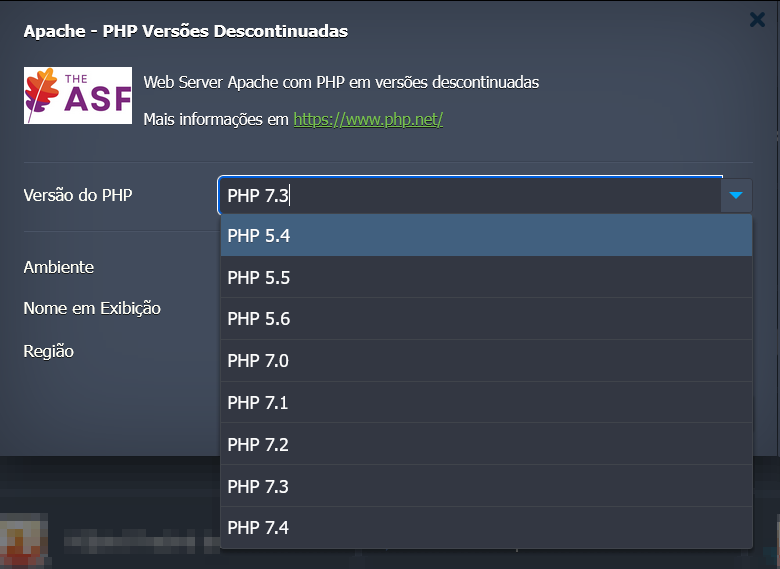
- PHP Version
Choose the desired version from the available options:- PHP 5.4
- PHP 5.5
- PHP 5.6
- PHP 7.0
- PHP 7.1
- PHP 7.2
- PHP 7.3
- PHP 7.4
🔑 Initial Access
After provisioning, the environment will be ready for deploying the PHP application.
✅ Best Practices
- Use this environment only to maintain legacy applications that have not yet been updated.
- Configure firewall and access restrictions to reduce the attack surface.
- Always use Let's Encrypt SSL certificate to protect traffic.
- Plan a future migration to supported PHP versions.
⚠️ Important Notice
Legacy PHP versions no longer receive official security updates.
Therefore, it is strongly recommended to:
- Use this environment only temporarily.
- Review the application code and migrate to a supported PHP version.
🛠️ Troubleshooting
- If the application does not run correctly, check the selected PHP version.
- In case of compatibility errors, adjust the
php.iniwithin the environment. - If SSL is not applied, verify that the domain is correctly pointed to the environment's IP.