Spring Boot Thin Jar Builder: Installation in the Marketplace
🚀 What is Spring Boot Thin Jar Builder?
The Spring Boot Thin Jar Builder is a tool that packages Spring Boot applications in a lighter format called thin jar. This type of artifact contains only the compiled application code and references to external libraries, without including the server runtime.
Therefore, the final file is smaller than a fat jar, which embeds all dependencies and the runtime. On the first run, dependencies are automatically downloaded and stored in the local repository in Maven (~/.m2/repository).
Thus, the thin jar makes the build, deploy, and update process faster and more efficient, especially in cloud environments like Jelastic/Virtuozzo.
🔍 Installing Spring Boot Thin Jar Builder
Go to the Marketplace tab in the platform panel, near the upper right corner, and search for Spring Boot Thin Jar Builder.
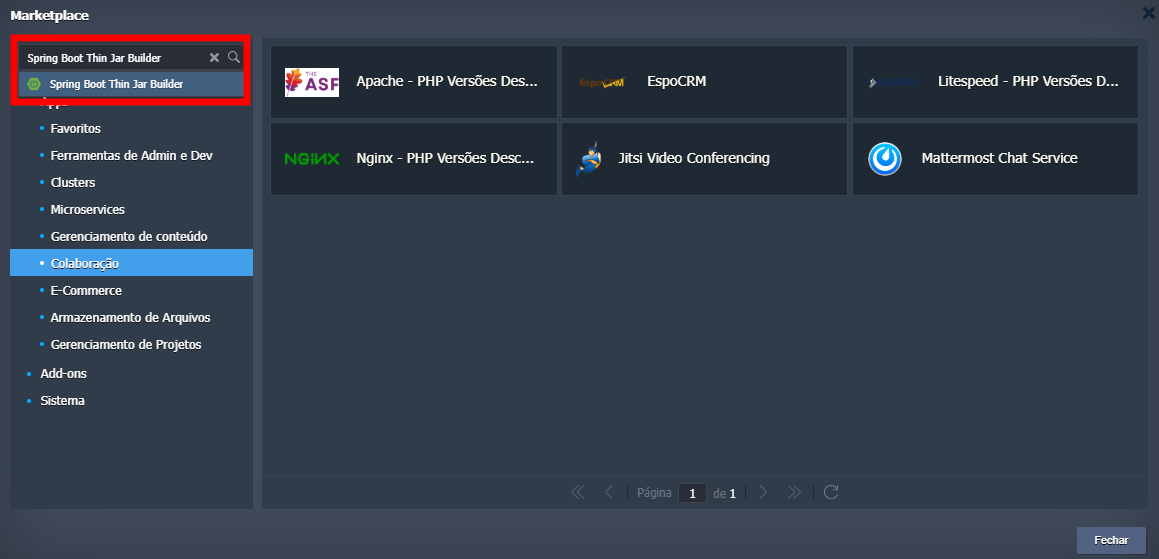
When accessing the installer, you need to define:
- The repository link of your project.
- The working directory where the pom.xml file is located.
- The environment name.
- The display name in the panel.
- The region where it will be installed.
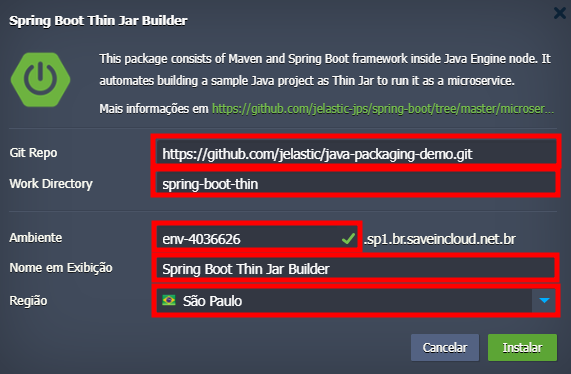
Currently, the available regions are São Paulo, Fortaleza, and Brasília.
🌐 Accessing the application
To access your application, just click the Open in browser icon or use the environment host.

⚙️ Environment topology
After installation, the environment consists of:
- 1 Spring Boot node
- 1 Maven node
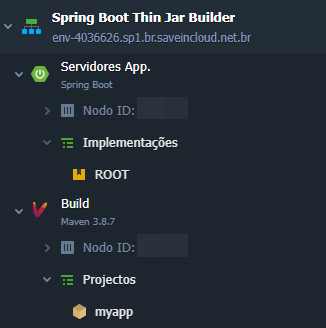
Your environment settings can be changed later in Change environment topology, where you can add more nodes, assign IPv4/IPv6, increase cloudlet and disk usage, among others.

🧠 Questions?
Contact technical support and send your question—we are available to help you!