☄️ Open Liberty in Kubernetes
Open Liberty is a lightweight and flexible open-source Java application runtime. It is specifically designed for the development of microservices and cloud-native applications. Its modular nature allows you to include only the necessary features, resulting in fast startup times and low memory consumption, ideal characteristics for container environments such as Kubernetes.
🚀 Installing Open Liberty in Kubernetes via Marketplace
- In the SaveinCloud platform dashboard, go to the MARKETPLACE;
- In the search bar, look for Open Liberty in Kubernetes;
- Click Install
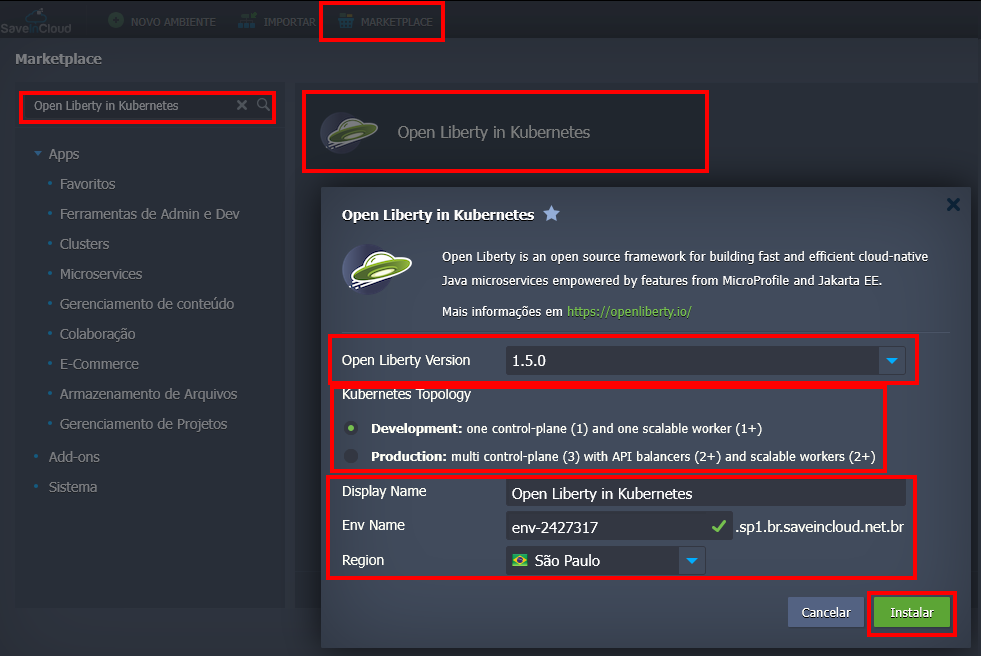
On the installation screen, enter:
-
Open Liberty Version: Allows you to choose the specific version of Open Liberty that will be installed in the environment.
-
Kubernetes Topology: Defines the architecture of your Kubernetes cluster:
Development: A minimal configuration, with only one control-plane node and one worker node. It is ideal for development, testing, and projects that do not require high availability, also being the most cost-effective option.
Production: A robust and high-availability configuration. It includes multiple control-plane nodes (3), API load balancers (2+), and multiple worker nodes (2+). This architecture avoids single points of failure and is designed to support production applications with real traffic.
-
Display Name: Set the label that will appear on the dashboard;
-
Env Name: Set the environment name;
-
Region: Choose the region where the environment will be created.
Within a few minutes, the environment will be created on the dashboard. Access credentials will be sent via the registration email.
🧠 Questions?
Contact technical support and send your question—we are available to help you!