💾 MariaDB Database Backup Manual
The platform provides certified database stacks with a simple and practical script to perform backups of stored data. The process is easy and can be completed in just a few minutes. No specialized knowledge is required — just follow the setup steps and set the appropriate cron expression.
⏱️ Scheduling Backups
We will use the standard backup script to automate the process and configure it according to your needs (e.g., frequency, number of old backups to keep, etc.).
📂 Step 1: Access the Backup Script
The script source code can be viewed directly in the panel:
- Click the Config button next to your database.
- This will open the built-in file manager.
- Locate the file:
/var/lib/jelastic/bin/backup_script.sh

❗ Attention: The backup script is not available for the Redis stack, as it is a key-value storage, usually used as cache.
🕒 Step 2: Automate with Cron
To automate the script execution, we use the cron scheduler, already available in the containers.
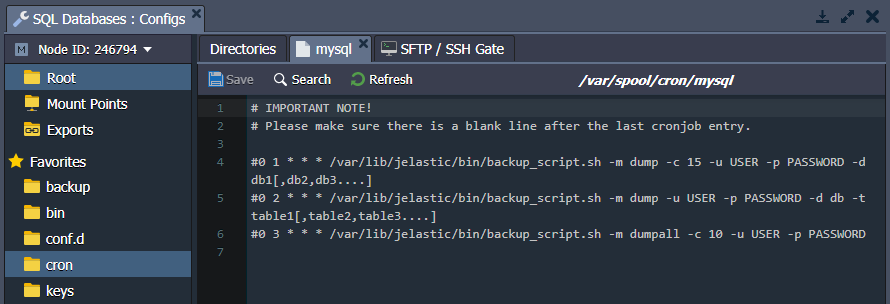
Open the file:
/var/spool/cron/mysql
And insert a cron expression in the format:
{frequência} {caminho-para-o-script} {parâmetros-do-script}
🧩 Parameters:
**{frequência}**: defines when the script will run (e.g.,*/10 * * * *= every 10 minutes).**{caminho-para-o-script}**: script path (e.g.,/var/lib/jelastic/bin/backup_script.sh)**{parâmetros-do-script}**: custom parameters. See some examples:
-m {modo}         # "dumpall" para todo o banco ou "dump" para parte
-c {quantidade}   # Número de backups antigos a manter (ex: -c 3)
-u {usuario}      # Usuário do banco
-p {senha}        # Senha do banco (entre aspas se tiver caracteres especiais, ex: -p "pass\\%123")
-d {bancos}       # Lista de bancos separados por vírgula (opcional)
-t {tabelas}      # Lista de tabelas específicas (opcional)
🔁 Example:
Full backup every 10 minutes, keeping the 3 most recent:
*/10 * * * * /var/lib/jelastic/bin/backup_script.sh -m dumpall -c 3 -u root -p passw0rd
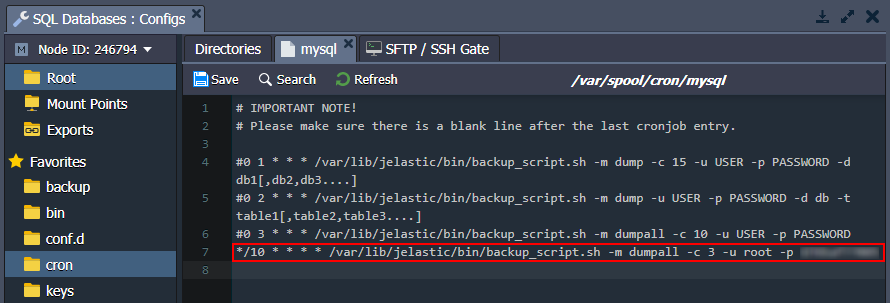
Save the file to apply the settings.
🌐 Step 3: Store on Another Server
You can configure a remote mount point to store data outside the container.
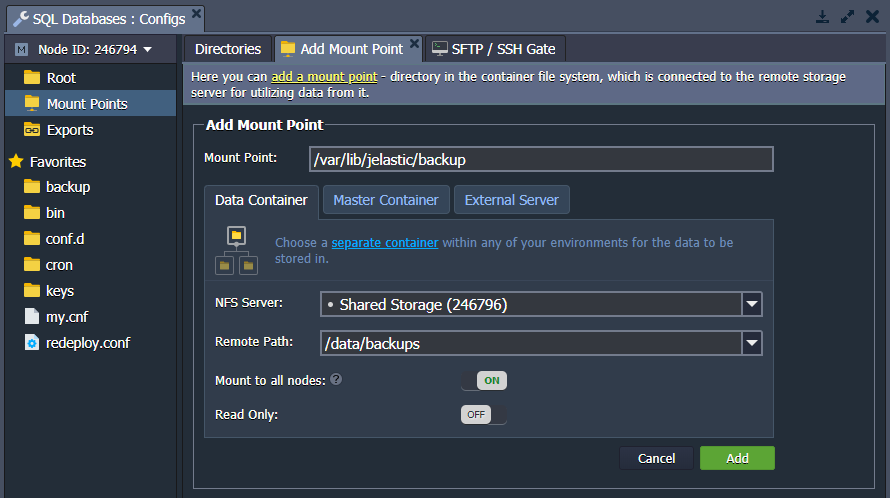
⚠️ Attention: Any data already present in the mount point folder will be replaced by the files from the remote directory.
💡 Alternatively, create a custom script on the remote server and connect using the database credentials to perform backups.
🔎 Verify Backups
Wait for the cron execution (according to the defined frequency) and access the folder:
/var/lib/jelastic/backup
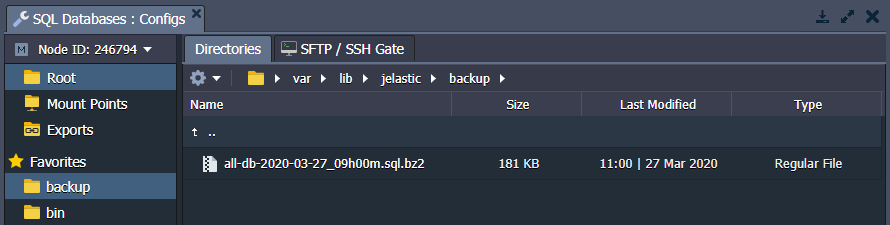 📦 If everything goes well, you will see the file
 .bz2 successfully generated.
📥 Download the Backup
You have several options to download the backup:
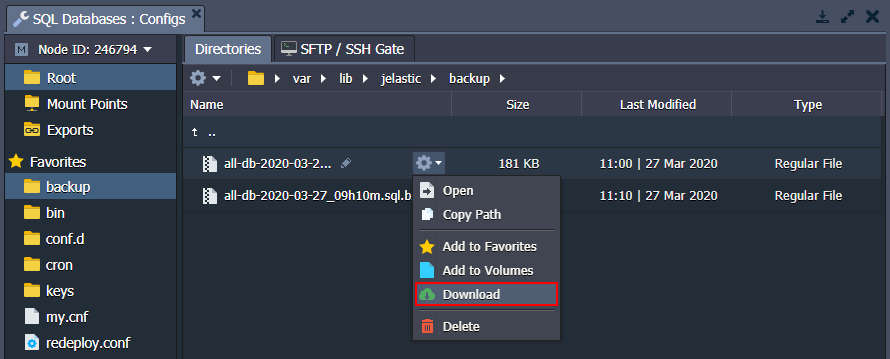
1. 🖥️ Through the Configuration Panel
- Access the file manager in the panel.
- Locate the desired file.
- Right-click and select Download.
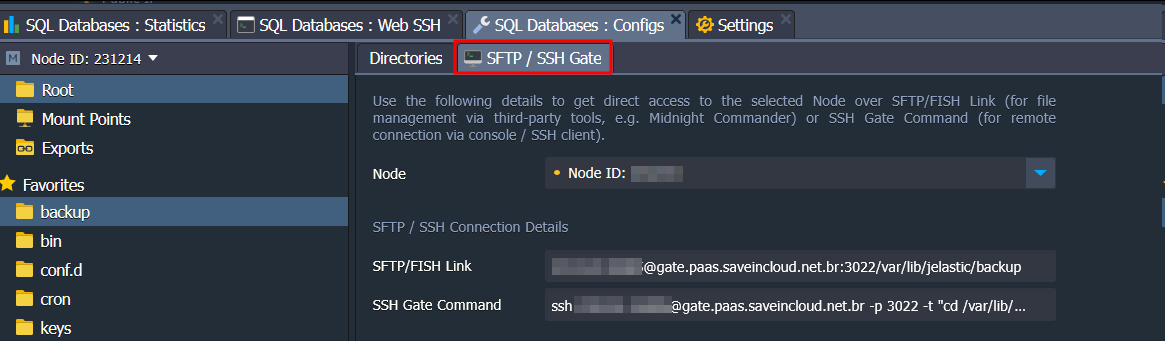
2. 🌐 Via SFTP/FISH Protocols
- Connect via SFTP or FISH using the access data available in the panel.
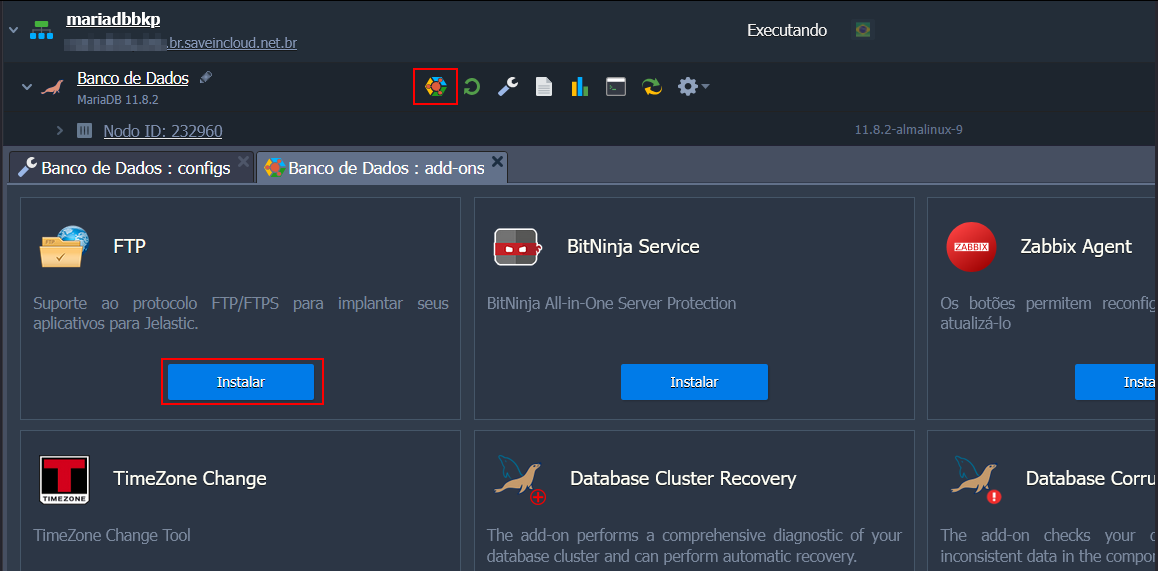
3. 🔌 Via FTP (Add-on)
- Install the FTP add-on on your database.
- Requires a public IP (it will be added automatically if necessary).
✅ Choose the Best Option for You
With these options, you can adapt the backup method to your needs — whether local or remote, manual or automatic.