⚙️ Memcached on the SaveinCloud platform
This guide aims to instruct the installation, configuration, integration, and best practices of the Memcached version 1.6.38 stack on the SaveinCloud PaaS platform, ideal for applications that demand high performance in in-memory data caching.
Memcached is a high-performance distributed in-memory cache system used to reduce database load and speed up web applications.
🚀 How to create your Memcached instance
Step 1 – Creating the instance
- Access the SaveinCloud panel.
- Click on New Environment.
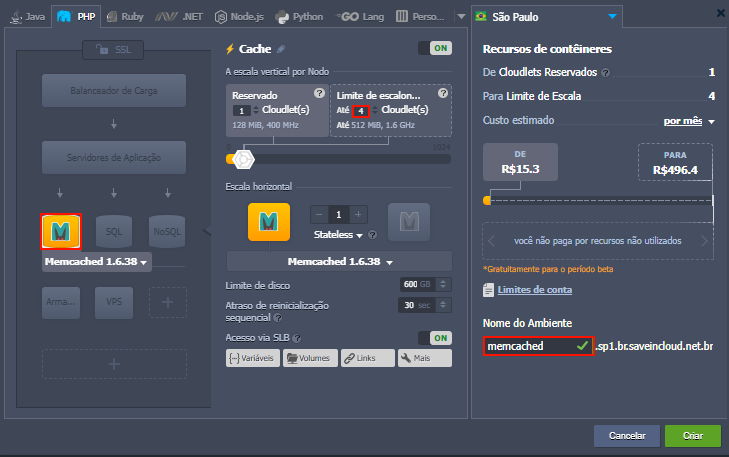
- In the Cache tab, select Memcached 1.6.38.
- Define the resources (CPU, RAM, and Storage) according to your needs.
- Click Create and wait for the deployment.
🔧 Accessing Memcached
-
Memcached does not have a web interface. Administration is done via command line or client application.
-
Use any Memcached client compatible with your language (PHP, Python, Java, Node.js, etc.).
-
To test connections, use:
telnet <IP_da_instância> 11211
The default Memcached port is 11211.
🌐 Recommended port openings
| Port | Description |
|---|---|
| 11211 | Memcached TCP port |
⚠️ Important: By default, Memcached does not have authentication. Therefore, NEVER expose port 11211 to the internet. Allow access only from internal IPs or specific IPs of your application.
🔌 Simplified integration with your application
🔸 PHP
$mem = new Memcached();
$mem->addServer('IP_DO_MEMCACHED', 11211);
$mem->set('chave_teste', 'valor', 300);
echo $mem->get('chave_teste');
🔸 Python
from pymemcache.client import base
client = base.Client(('IP_DO_MEMCACHED', 11211))
client.set('chave_teste', 'valor')
print(client.get('chave_teste'))
🔸 Node.js
const memjs = require("memjs");
const client = memjs.Client.create("IP_DO_MEMCACHED:11211");
client.set("chave_teste", "valor", { expires: 300 });
client.get("chave_teste", (err, val) => console.log(val.toString()));
🔸 Java
MemcachedClient client = new MemcachedClient(new InetSocketAddress("IP_DO_MEMCACHED", 11211));
client.set("chave_teste", 300, "valor");
System.out.println(client.get("chave_teste"));
✅ Replace
IP_DO_MEMCACHEDwith the private IP of your instance.
🔐 Secure access
- Configure firewall restricting access to port 11211 only to the IPs of your application.
📜 Useful commands
🔸 Check connection status
echo stats | nc <IP_da_instância> 11211
🔸 Clear all caches
echo flush_all | nc <IP_da_instância> 11211
♻️ Backup and Persistence
⚠️ Memcached does not offer data persistence. All stored content is volatile and resides in memory.
For scenarios requiring persistence, consider using Redis, which has this functionality.
📈 Monitoring
- Important metrics:
- Memory usage
- Hit ratio
- QPS (Queries per second)
- Open connections
🔄 Scalability
- Horizontal: Add new instances and distribute keys among nodes.
- Sharding must be done in the application or using compatible libraries.
🔥 There is no native replication in Memcached.
🛠️ Troubleshooting – Common issues
❌ Cannot connect to port 11211
- Check if the port is open in the firewall.
- Check if the service is running:
sudo systemctl status memcached
❌ Cache is not being stored
- Check if there is available memory.
- Check if the application is not inadvertently executing
flush_all.
❌ High memory usage
- Adjust the parameter
-min the file/etc/sysconfig/memcachedto limit RAM.
📚 Official documentation
⚠️ All configurations made in this manual are simple and hypothetical examples. Adaptations will be necessary according to your environment topology.
🧠 Questions?
Contact the SaveinCloud technical support team. We are ready to help!