🍃 MongoDB on the SaveinCloud platform
This guide aims to instruct the creation, configuration, and best practices for using the MongoDB stack on the SaveinCloud PaaS platform, ideal for applications that require a robust, scalable, and highly available NoSQL database.
🛠️ Installation via Panel
- Access the SaveinCloud panel and click New Environment.
- In the NoSQL layer, select
MongoDB.
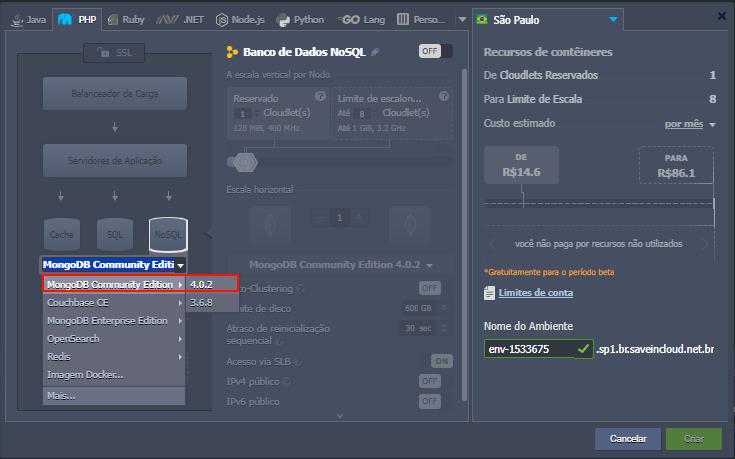
You can select the MongoDB version and configure the instance resources:
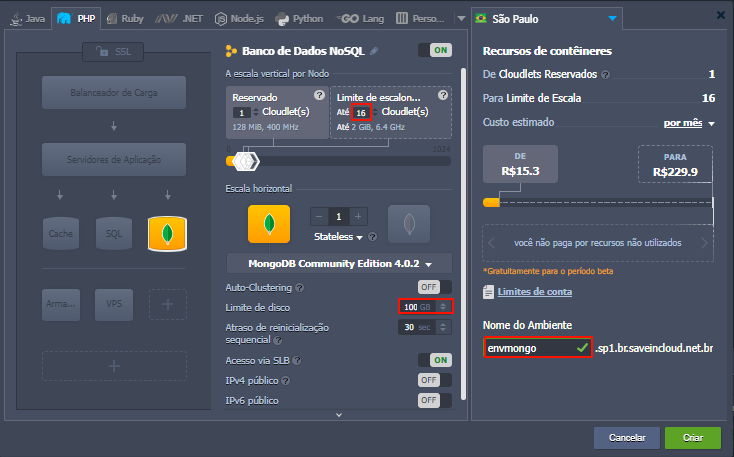
ℹ️ To choose between Reserved or Dynamic Cloudlets, see: Cloudlets and Scalability.
⚠️ If you choose Public IP, external access will be on the default MongoDB port 27017. Remember to create firewall rules to restrict access to the desired IPs.
📁 Accessing your MongoDB
After creating your instance, you will receive access data by email:
- Address: Host or Public IP
- Port: 27017 (MongoDB default)
- User: admin
- Password: Automatically generated
🔐 Access via Web SSH
mongo -u admin -p 'suaSenha' --authenticationDatabase admin
🔐 Remote access
mongo --host IP_DO_SERVIDOR --port 27017 -u admin -p 'suaSenha' --authenticationDatabase admin
Or using the MongoDB interface, address sent by email
🗄️ Important Folder Structure
/var/lib/mongo/             # Diretório dos dados persistentes
/etc/mongod.conf               # Arquivo principal de configuração
/var/log/mongodb/mongod.log    # Logs da instância MongoDB
💡 Check the Backup Configuration Documentation to create a backup routine and ensure data persistence.
📈 Optimization and Performance
- Use appropriate indexes for your collections.
- Monitor RAM, disk, and connection usage.
- For heavy workloads, consider distributing data using Sharding.
- Configure connection limits in the
/etc/mongod.conffile. - Monitor with:
db.serverStatus()
or tools like PMM, Zabbix, and Grafana.
💡 Check the Official MongoDB Performance Documentation for best tuning and scalability practices.
🔐 Recommended Security
- Enable mandatory authentication (
authorization: enabled). - Use internal connections whenever possible.
- Configure restrictive firewall rules.
📚 Related Resources
🧠 Questions?
Contact the SaveinCloud technical support team. We are ready to help!