🚀 Redis on the SaveinCloud Platform
This guide aims to instruct on the creation, configuration, and best practices for using the Redis stack on the SaveinCloud PaaS platform, ideal for applications that require high performance in caching, queues, and in-memory data storage.
🛠️ Installation via Panel
- Access the SaveinCloud panel and click New Environment.
- In the NoSQL layer click on
Redis.
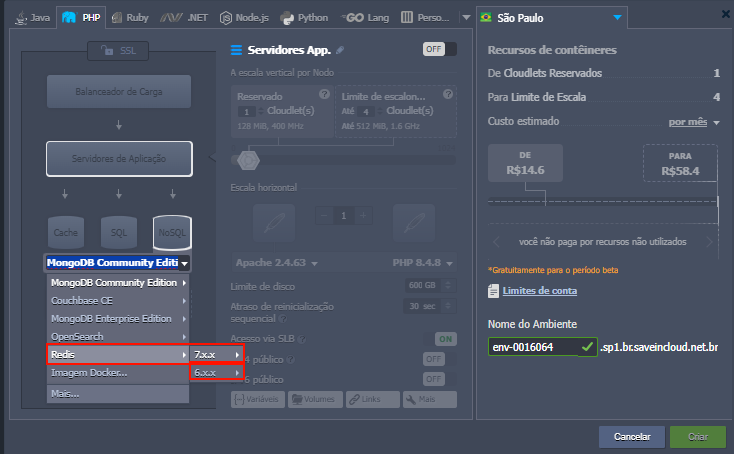
You will see the option to select the Redis version and the resources to be assigned:
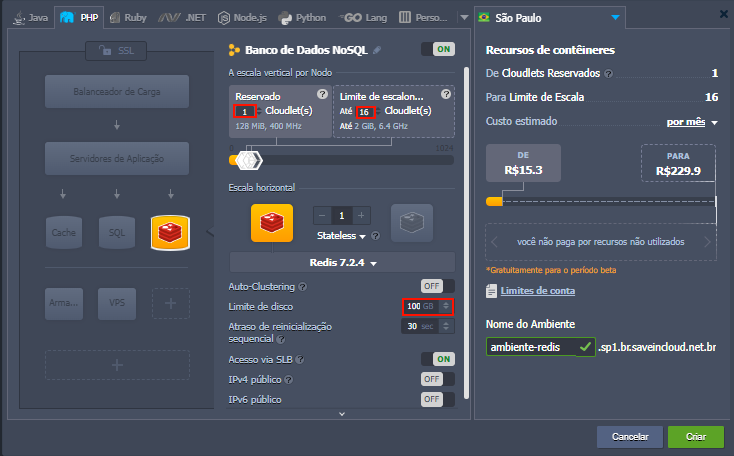
ℹ️ To choose between Reserved or Dynamic Cloudlets, see: Cloudlets and Scalability.
⚠️ When the Public IP option is checked, external access must be done using Redis's default port 6379.
📁 Accessing your Redis
After creating your instance, you will receive access data by email:
- Address: Host or Public IP
- Port: 6379 (Redis default)
- Password: Automatically generated
🔐 Accessing via CLI (Web SSH)
redis-cli -h localhost -p 6379 -a suaSenha
🔐 Accessing remotely
redis-cli -h IP_DO_SERVIDOR -p 6379 -a suaSenha
Or using GUI clients like RedisInsight, Another Redis Desktop Manager, or integrating directly into your application.
🗄️ Important Folder Structure
/etc/redis/redis.conf           # Arquivo principal de configuração
/var/lib/redis/                 # Diretório de armazenamento dos dados persistentes (RDB/AOF)
/var/log/redis/                 # Logs do Redis
🔌 Data Persistence
Redis has two main persistence methods:
- RDB (Snapshotting): Generates periodic backups in snapshot format.
- AOF (Append Only File): Logs all operations that modify data.
The configuration for these methods is in the file:
/etc/redis/redis.conf
Look for the sections:
- save (for RDB)
- appendonly (for AOF)
📈 Optimization and Performance
- Adjust the maxmemory parameter to control RAM usage.
- Set the key eviction policy (maxmemory-policy) according to your needs, examples:
- volatile-lru
- allkeys-lru
- volatile-ttl
- noeviction
- Use internal connections whenever possible to reduce latency.
- Monitor Redis with tools such as:
- redis-cli info
- htop / top
💡 Check the Redis Memory Configuration Documentation to properly estimate the required resources.
📚 Related Resources
🧠 Questions?
Contact the SaveinCloud technical support team. We are ready to help!