Firewall Management – Platform
🔐 A good firewall configuration is essential to ensure the security of your cloud infrastructure. SaveinCloud provides a simple and powerful interface for this management.
🧱 Part 1 – Accessing the Firewall Manager
Step 1 – Access the SaveinCloud Panel
- Log in at: https://app.paas.saveincloud.net.br
- Select the environment you want to configure.
- Click
- In the side menu, click Firewall.
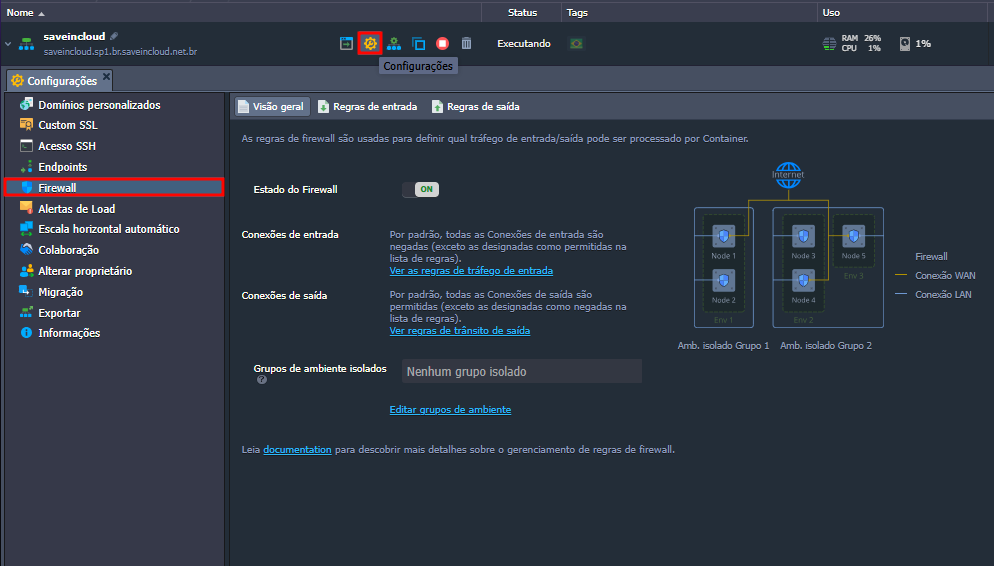
📊 Part 2 – Firewall Overview
In the Overview tab, you will see:
-
🔘 Firewall Status (ON/OFF)
When the firewall is enabled, all connections will be filtered according to your rules. -
🌐 Inbound/Outbound Connections
Allows configuring whether the environment will accept all connections or only those allowed by the rules. -
🧩 Isolated Environment Groups
Allows segmenting environments into isolated groups, ensuring they do not communicate with each other by default (LAN).
💡 By isolating environments, you improve network security and prevent lateral traffic between containers of different environments.
🔐 Part 3 – Inbound Rules
✅ Creating a new inbound rule
- Go to the Inbound Rules tab
- Click New Rule
- Fill in the following fields:
| Field | Example | Description |
|---|---|---|
| Nodes | Load Balancer | Select the node (container) where the rule will be applied |
| Name | HTTP/HTTPS | Descriptive name to identify the rule |
| Protocol | TCP | Connection protocol (TCP or UDP) |
| Port Range | 80,443 | Single port or range (e.g., 8000-8100). Leave blank for all ports |
| Source | All | Defines the connection source (all, specific IPs, local network, etc.) |
| Priority | 1040 | Priority number. Lower number = higher priority |
| Action | Allow | Defines if the traffic will be Allowed or Denied |
- Click Save to apply the rule.
💡 Priority: Rules with lower priority values are evaluated first. Use this to deny access before allowing it, if necessary.
⚠️ Avoid using "All" or "Internet (Public Access)" with sensitive ports like SSH (22) without restricting by IP.
🌍 Part 4 – Outbound Rules
✅ Creating a new outbound rule
- Go to the Outbound Rules tab.
- Click New Rule.
- Configure as needed:
| Field | Example | Description |
|---|---|---|
| Protocol | TCP | Type of traffic |
| Port | 80, 443 | HTTP/HTTPS |
| Destination IP | 0.0.0.0/0 | Destination IPs (any) |
| Action | Allow | Defines if the connection is allowed |
🔧 In SaveinCloud, all outbound accesses are allowed by default unless you explicitly configure to deny.
🧠 Part 5 – Best Practices and Security
⚠️ Never open unnecessary ports. Each exposed service can be a security vulnerability.
- Restrict access by IP where possible.
- Use key authentication for SSH.
- Review your rules periodically.
- Document every change made to the firewall.
🛠️ Troubleshooting – Common Issues
❌ I cannot access my application
- Check if the application port is allowed in the inbound rules.
- Confirm if the source IP is included in the rule.
- Validate if the application is listening on the correct port:
netstat -pltn | grep :80