💎 Deploy Ruby Application with Apache on SaveinCloud
⚠️ All configurations shown in this manual are simple and hypothetical examples. Adaptations may be necessary according to your environment topology.
This guide shows how to deploy a Ruby application using Apache + Passenger within the SaveinCloud platform.
✅ Recommended Requirements
Before starting the deployment, make sure the project contains:
-
Ruby source code ready to run (example: Sinatra or Rails application);
-
A valid
config.rufile for Rack; -
A
Gemfilewith listed dependencies (example:sinatra,rack,passenger); -
Well-organized directory structure;
-
.htaccessfile with Passenger configuration.
Part 1 - Configuring the Topology with Apache Ruby
🔧 Step 1 – Topology Setup
Add the Apache service to the application layer.
Example of an Apache Ruby topology:
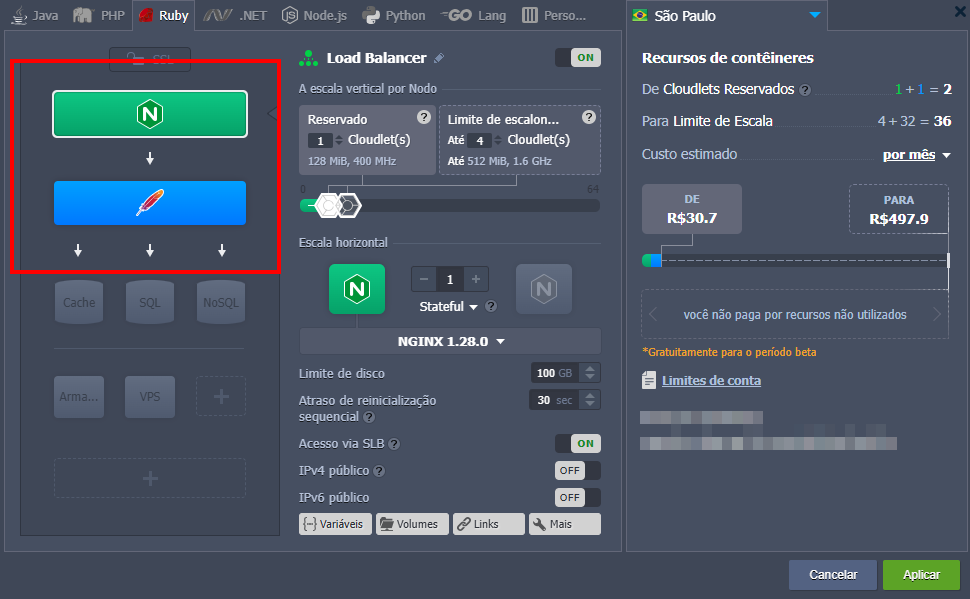
Load Balancer (opcional) → Apache → Aplicação Ruby
💡 If you want to use HTTPS, configure the Let's Encrypt addon directly in Apache or use a Load Balancer with SSL.
Adjust the reserved cloudlets according to the application's needs.
Part 2 - Deploying the Application
📁 Deploy via ZIP Upload
- Access the Deploy File tab in Apache.

- Upload the
.zipfile containing your Ruby application.
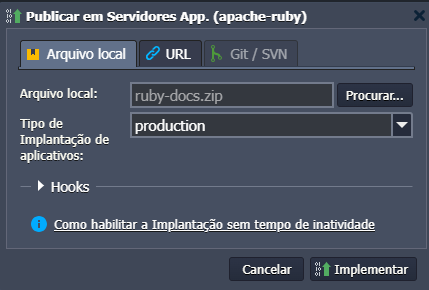
✅ The content will be automatically extracted to the selected context at the time of deployment, e.g.,
/var/www/webroot/ROOT
Part 3 - Ruby Environment Configuration (Passenger)
📑 Customizing .htaccess
For Passenger to recognize your Ruby application, create a .htaccess file inside the application root.
ℹ️ Adjust paths as necessary.
📑 Installing Gems
After uploading the project, access the environment via SSH and install Ruby dependencies:
✅ Make sure the
Gemfilecontains all required dependencies.
🛠️ Troubleshooting
❌ Passenger - Could not spawn process for application
Cause: Missing gems or syntax error in the code.
Solution:
Check the Apache error log:
/var/log/httpd/error_log
❌ Syntax error in config.ru
Cause: Incorrect configuration in the config.ru file.
Solution:
Verify that the file contains a correct require and a valid Rack application instance.
❌ Incomplete response received from application
Cause: The Ruby application did not return a valid HTTP response.
Solution:
Review the Ruby code, especially app.rb and config.ru. Test locally with rackup before deploying.
❌ Error 500 - Internal Server Error
Cause: Permission issues, missing gems, or Passenger startup failure.
Solution:
Review Apache and Passenger logs:
/var/log/httpd/error_log