🚀 What is PM2?
PM2 is an advanced process manager for Node.js applications, designed to facilitate running, monitoring, and maintaining applications in production environments. It ensures your application stays online by automatically restarting it in case of failures and offers additional features such as load balancing and performance monitoring.
🔍 Main Advantages of PM2
-
Simplified Process Management: With simple commands like
pm2 start,pm2 stop,pm2 restart, andpm2 delete, you can easily control your application's processes. -
Load Balancing with Cluster Mode: PM2 automatically distributes requests across multiple instances of the application, leveraging all available CPU cores and improving performance.
-
Centralized Log Management: View and analyze your application's logs in a consolidated way with the command
pm2 logs. -
Zero Downtime Deployments: Update your application without interruptions using the command
pm2 reload, ensuring a seamless experience for users. -
Integrated Monitoring: Track metrics such as CPU usage, memory, and process status in real time with the command
pm2 monit.
🛠️ How to Use PM2 on SaveinCloud
On the platform, you can integrate PM2 into your Node.js application in two main ways:
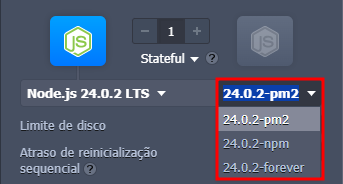
1️⃣ - Selecting the "PM2" Tag When Creating the Environment
When creating a new environment on SaveinCloud, you can choose a pre-configured image that already includes Node.js and PM2 installed. This option speeds up the deployment process, allowing your application to be managed by PM2 from the start.
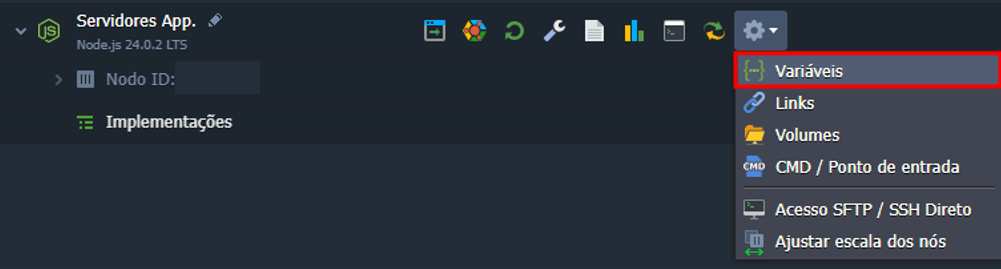
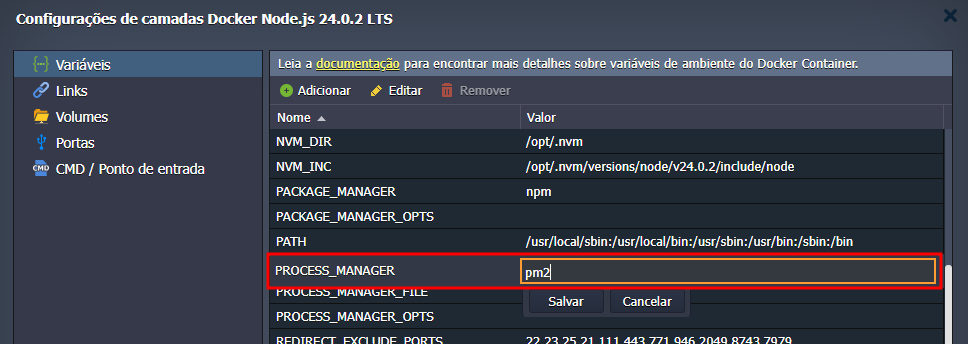
2️⃣ - Configuring PM2 via Environment Variables
If you already have a running environment, you can configure PM2 using environment variables.
📄 Configuration of the ecosystem.config.js File
For PM2 to properly manage your application, you need to create a configuration file named ecosystem.config.js in the /home/jelastic/ROOT directory. This file defines how PM2 should start and monitor your application.
You can generate a basic configuration file with the following command:
pm2 init simple
Example content for ecosystem.config.js:
module.exports = {
  apps: [
    {
      name: "nome-aplicacao",
      script: "./server.js",
      autorestart: true,
    },
  ],
};
Explanation of Fields:
- name: Name of the application process.
- script: Entry file of the application (for example, server.js).
🔒 Make sure to open the port your application uses in the firewall to ensure proper operation.
🔗 To learn about Firewall Management, click here!
🧰 Useful PM2 Commands
-
pm2 start application-name: Starts the application.
-
pm2 stop application-name: Stops the application.
-
pm2 delete application-name: Removes the application from PM2.
-
pm2 restart application-name: Restarts the application.
-
pm2 reload application-name: Reloads the application without downtime.
-
pm2 start application.js -i max: Starts the application in cluster mode, using all available cores.
-
pm2 list: Lists all applications managed by PM2.
-
pm2 monit: Displays real-time monitoring of applications.
-
pm2 logs: Shows the application logs.
-
pm2 save: Saves the current state of applications for future restoration.
💡 Remember to store your package.json file inside the directory of the $ROOT_DIR variable (by default, it is /home/jelastic/ROOT), as the platform will execute the command npm install to install the dependencies contained in your file (the environment variable $UPDATE_PACKAGES_ON_RESTART needs to have the value true).