🧶 What is Yarn?
Yarn is a JavaScript package manager created by Facebook as an alternative to NPM, focusing on performance, reliability, and security. Like NPM, it allows you to install dependencies and run application startup scripts.
Yarn is not a process manager. That is, it does not keep your application running in the background, does not automatically restart in case of failures, and does not provide fault tolerance.
For production environments, it is recommended to use PM2 as the process manager. To learn about PM2, click here!
🛠️ How to use Yarn on SaveinCloud
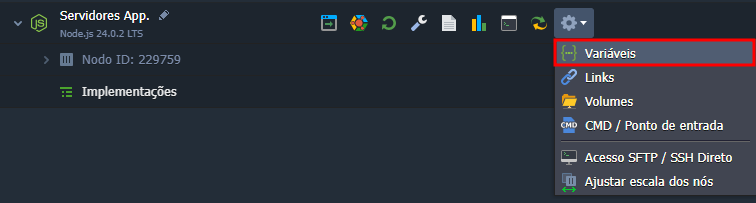
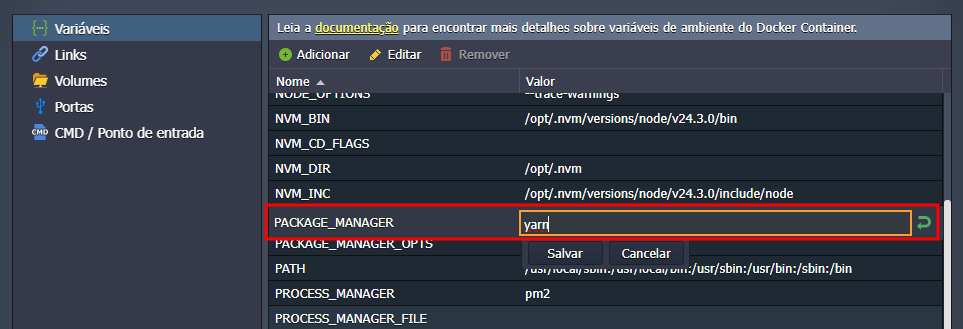
By default, NPM is configured to be used as the package manager on Node.js instances. To use Yarn, just change the value of the environment variable PACKAGE_MANAGER to yarn, following the steps below.
🚀 Configuring scripts with Yarn
Just like with NPM, Yarn runs scripts defined in the package.json file. Yarn looks for the start script by default.
Example:
{
  "scripts": {
    "start": "node ./server.js"
  }
}
You can start the application with:
yarn start
📄 Location of the package.json
The package.json file must be located in the /home/jelastic/ROOT directory - which is the default defined in the environment variable $ROOT_DIR, and the directory can be changed as needed - because this is where the platform runs dependency installation and application startup commands.
If the main application file does not follow the standard names (server.js, index.js, app.js), you can use the environment variable $APP_FILE to define the entrypoint.
📦 Installing Dependencies with Yarn
To have dependencies installed automatically with Yarn at instance startup, you can use the environment variable:
UPDATE_PACKAGES_ON_RESTART=true
With this, the platform will execute:
yarn install
every time the instance is restarted.
🔒 Make sure to open the firewall port your application uses to ensure proper operation. To learn about Firewall Management, click here!
🧰 Useful Yarn Commands
| Command | Description |
|---|---|
yarn install | Installs all dependencies listed in package.json. |
yarn add <pacote> | Installs and adds a specific package. |
yarn remove <pacote> | Removes a package from the project. |
yarn start | Runs the start script defined in package.json. |
yarn run <script> | Runs another custom script. |
yarn outdated | Lists outdated dependencies. |
yarn upgrade | Updates packages to the latest allowed version. |
🧠 Questions?
Contact technical support and send your question; we are available to help you!