🐙 Docker Swarm on the SaveinCloud platform
This guide aims to guide the creation of a Docker Swarm cluster on the SaveinCloud platform, explaining the available options, essential commands, best practices, and management with Portainer.
🛠️ Installation via Marketplace
- Access the SaveinCloud panel.
- Click on MARKETPLACE.
- Search for Docker Swarm Cluster.
You will see a screen with options such as:
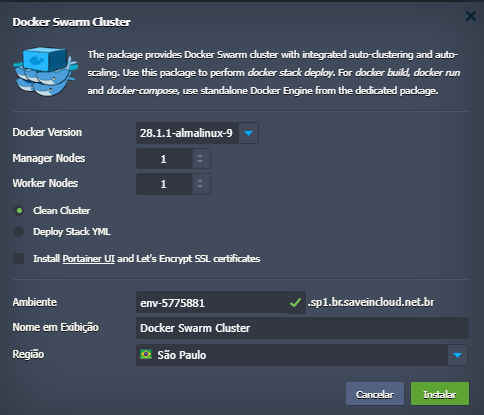
🔢 Docker Version
Select the desired Docker version (e.g., 28.1.1-almalinux-9).
⚙️ Manager Nodes / Worker Nodes
Define how many Manager and Worker instances your cluster will have.
🧠 Understanding the Fields: Manager Nodes and Worker Nodes
🧑✈️ Manager Nodes
Managers are the nodes responsible for:
- Managing the global state of the cluster
- Coordinating tasks, services, and scaling
- Making orchestration decisions (for example, restarting containers in case of failure)
Recommendations:
- Use an odd number of managers to avoid ties (1, 3, 5...)
- For high availability, ideally have 3 managers
- Managers can also run containers (but you can disable this with
--availability drain)
🧑🔧 Worker Nodes
Workers are the nodes that:
- Execute the tasks and containers assigned by managers
- Do not participate in orchestration decisions
- Are ideal for horizontally scaling your services
Recommendations:
- Add more workers as your application load increases
- Workers can be easily replaced if they fail, without compromising the cluster
💡 You can start with 1 manager and 1 worker for testing, and increase as needed.
For production, the recommended minimum is 3 managers + 2 workers.
🧹 Clean Cluster
Creates an empty cluster, without pre-configured services.
📦 Deploy Stack YML
Allows you to automatically upload a docker-compose.yml file to deploy your stack as soon as the cluster is created.
✅ Install Portainer UI
Installs the graphical panel for Swarm management and applies SSL certificates with Let's Encrypt.
💡 Portainer will be accessible at:
https://<nome-do-ambiente>.sp1.br.saveincloud.net.br:4848/
🧪 Stack Example
Basic example of docker-compose.yml to use with docker stack deploy:
version: "3.8"
services:
  app:
    image: nginxdemos/hello
    ports:
      - 80:80
    deploy:
      replicas: 3
🔐 Security in Docker Swarm
⚠️ Never expose the 2377 port of the Swarm cluster to the internet!
- Use a private network between nodes.
- Block administrative ports.
- Use SSH key authentication.
📊 Management with Portainer
Access Portainer, click on Environments > Add environment and connect to the local socket to manage the cluster with a visual interface.
📚 Related Resources
✅ Final Checklist
- Cluster started via marketplace
- Workers and managers active
- Portainer installed and accessible
- Deployment completed successfully