🚀 Zero Downtime (ZDT) Deployment for PHP
Keeping applications always available is essential. During the update process (redeploy), many services face errors or become unavailable. The SaveinCloud platform offers a simple and efficient method to solve this problem in PHP applications: ZDT Deployment, based on best practices adopted by large companies like Etsy.
🔧 How it works
The ZDT Deployment process is based on two pillars:
-
With each new deployment, the application files are copied to a new folder with a timestamp.
-
A symlink (symbolic link) points to the current version of the application and is redirected instantly at the end of the deployment.
This allows:
-
The old version to continue serving users during the process.
-
The new version to be activated atomically at the end.
-
No interruption in the service.
📈 Deployment Flow
1. Create or use an existing PHP environment
It is recommended to use Apache (with support for the mod_realdoc module) or NGINX.
2. Enable ZDT when deploying
When deploying a .zip or direct link:
- Check the option "Enable zero-downtime deployment"
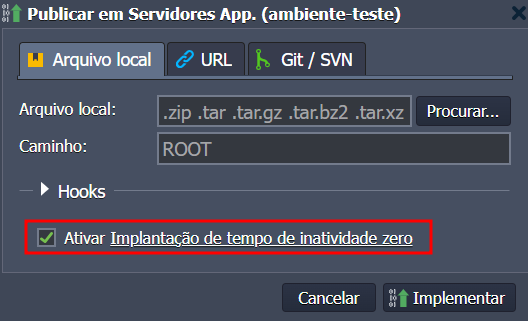
Or, when using a Git/SVN/Bitbucket repository:
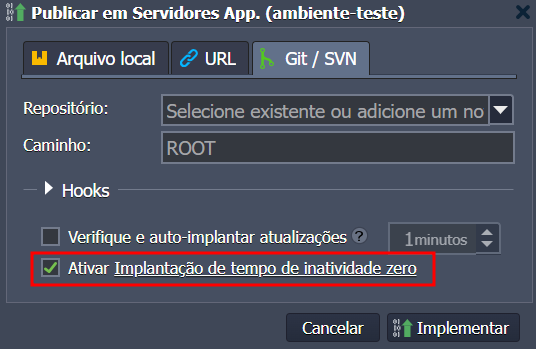
- The option is automatically enabled when deploying in the ROOT context.
⚠️ This option only works if the deployment is done in the ROOT context.
3. Directory structure
With each deployment:
-
A new folder is created like
ROOT_yyyy.mm.dd-hh.mm.ss -
The symlink
ROOTpoints to the active version
ls -l /var/www/webroot

4. Future updates
With each new deployment:
-
A new folder is created
-
The symlink is updated automatically
-
The previous version is kept (you can delete it manually later)
⚙️ Technical implementation
Apache PHP
Uses the mod_realdoc module with configurations in:
/etc/httpd/conf.d/mod_realdoc.conf
Useful parameter:
RealpathEvery 2
NGINX PHP
Native support for ZDT, with adjustments at the end of the file:
/etc/nginx/nginx.conf
⚖️ Comparison between methods
| Method | Response Time | Failures | Availability |
|---|---|---|---|
| Classic Deploy | Faster | Has | There is downtime |
| ZDT Deploy | Slightly higher | None | Always online ✅ |
📊 Tests with WordPress
Deploy via File (Classic)
-
Failure time: up to 2 seconds
-
Errors during the process
Deploy via File (ZDT)
-
No errors
-
Instant version switch
Deploy via Git (Classic)
- May fail during clone/push
Deploy via Git (ZDT)
-
Stable, no downtime
-
Preserves user-generated files
✅ Benefits
-
Smooth and transparent update
-
Preserves user-generated content
-
Lower risk of errors and downtime
🔚 Conclusion
ZDT Deployment is the best way to update PHP applications without impacting your users. With it, you ensure stability, security, and efficiency in your project update process.
💡 Recommended for all PHP environments with continuous or frequent deployment.